QR-Codes win mostly

QR-Codes win, mostly.
www.Weinwerbung.Tel
qrcode

Triest Transport

www.Triest.Tel


Friday, 21 January 2011

This is the homepage of the gtalX project. gtalX is a Linux client for gtalk, the voip application of Google. It supports voice and text-based chat.


This is the homepage of the gtalX project. gtalX is a Linux client for gtalk, the voip application of Google. It supports voice and text-based chat. Before you download it, please read the 'How to install' paragraph below.

You can download the latest released version of gtalX here (currently version 0.0.4).
You can download the latest unstable version of gtalX here (it won't even always build, but it includes the latest changes)

We are hosted on sourceforge, at this address: http://sourceforge.net/projects/gtalx/.


Description

gtalX is based on the libjingle library (version 0.4.0) provided by Google. gtalX is implemented using QT 4.3. We have written gtalX on Zenwalk, one of the best Linux distributions. Download the live cd and give it a try!

The current stable version of gtalX is 0.0.4 (it is an alpha version). The currently implemented functionalities are:

* Login with your gmail account
* Voice chat with someone who has gtalX (under Linux) or Gtalk (under M$ Windows)
* Text chat with someone who has gtalX (under Linux) or Gtalk (under M$ Windows)
* Customizable chat icons
* Language support (translation to Hungarian and a chance to translate it to any other language)
* Taskbar icon (next to the clock)

Planned features for the next version are:

* File transfer (works in unstable! :-))
* Logging of user actions into a local log-file for easier bug reporting (of course without any personal data)

How to install on (K)Ubuntu 9.10

(Please let me know if you experience any problems with the packages!! My email address is in the Contact Us section below. I only got to test the deb files on KUbuntu 9.10.)

To install on 32-bit Ubuntu 9.10 you can try this EXPERIMENTAL deb file (this installs today's snapshot of the unstable branch).
To install on 64-bit Ubuntu 9.10 you can try this EXPERIMENTAL deb file (this installs today's snapshot of the unstable branch).

The way to use the deb file:

sudo dpkg -i gtalx_0.0.5_i386.deb
# or if you have 64 bit Ubuntu
sudo dpkg -i gtalx_0.0.5_amd64.deb

# you will get a dependency error after the above line so you'll need to execute this next:
sudo apt-get -f install

To remove this package execute:

sudo apt-get remove gtalx

How to build & install on most Linux distros

1. Install prerequisites

In general you'll need QT4, gcc and probably some other development packages that you need to build binaries on your system. If you want to upgrade to a new version, uninstall the old version first. I collected the dependency packages from Ubuntu, you'll need these libraries. Since you'll need to build gtalx, get development packages (if your distro has separate dev packages). Here is the list:

(build-essential)
libqt4-dev
libogg-dev
libtheora-dev
libsdl-dev
libavcodec-dev
libswscale-dev
libexpat1-dev
libraw1394-dev
libvorbis-dev
libgsm1-dev
libspeexdsp-dev
libmediastreamer0-dev
libortp-dev

For the ./make script to work properly I also needed the pkg-config package on Ubuntu.

If your distro has speex, mediastreamer2 and ortp (see the last 3 items in the above list) you can try what you get form there, but in general gtalx builds and installs these if your computer does not have them. There can easily be a version conflict here; if you are unsure and you do not use ubuntu, do not install these, let gtalx take care of them. Please make sure that you do not have ortp installed but mediastreamer2 not installed as these 2 are very closely related and mediastreamer2 will not build with versions of ortp that it does not expect. On Ubuntu 8.10, 9.04 and 9.10 it is safe to install the libmediastreamer0-dev and libspeexdsp-dev packages, on the rest either install speex, mediastreamer2 and ortp or none of these.

In my experience on Slackware 12 you'll simply need to install QT4.
On Zenwalk you'll need (use netpkg) qt4-devel*

2. Perform the build

* Extract the tar.gz file into any folder you like (tar -xvf .tar.gz)
* Change into the created directory, add execute permissions to ./make (chmod +x ./make) and run ./make

3. Install

* Become superuser (su, or use sudo)
* Execute ./make install

If all is ok, after these steps you can execute gtalX by typing gtalx at the command prompt (or you can start it from the start menu).

If you want to uninstall, you should execute the uninstall script as root from the directory where you called ./make install. Actually after you have installed gtalX successfully, you can delete all the source and build files, but please keep the uninstall script. The uninstall script alone will let you uninstall gtalX, you won't need any other files to do that.

If you use the unstable version then on Ubuntu instead of the ./make install step you can create a deb package by running
./make ubuntu
Then proceed as usual about installing a deb file (if unsure, see above)

Comment:

We test/use gtalX on Slackware, Zenwalk and Kubuntu. If you are using a different distro and gtalx does not build, or there is another problem, please let us know. If you have a fix for the problem, we would gladly and gratefully integrate that fix into the software, but we do not have the time to test this software on any other distributions. Still, we surely hope that it will work on more than these 3 ones. Actually we know that it works on gentoo, opensuse and fedora as well.

Screenshot

How to translate

If you have an installed gtalX with our make script, in the /usr/share/gtalx/languagefiles directory you will find a file called Hungarian.txt. Copy that file; the name of the new file should be the English name of the language into which you are going to translate gtalX (e.g. French.txt or German.txt). If you start gtalX in an environment that is different from English, gtalX will load the file automatically. If no such file exists, it will print an error message that you can read if you start it from a console. E.g.

language file not found: /usr/bin/../share/gtalx/languagefiles/French.txt

Obvoiusly if you want to translate gtalX into French, you need to create a file called French.txt in the above mentioned directory. Once you have copied Hungarian.txt, edit it, and I think it is easy to figure out what is to be done.

The second line in Hungarian.txt is:
"Translated by"="Fordította: Békés József"

This is a text that will appear in the About dialog; put your own name so that it will be displayed in the About dialog.

If you start gtalX from your console, and a translation is missing, gtalX will complain and will tell you which item is missing in its output to the console. Otherwise it will substitute the English phrase for missing translations in the application.

If you want to translate on an English system, you can modify gtalX's language if you start it and specify the LANG environment variable, like this (if you enter this into the console, gtalX tries to start in German; since there is no German.txt it fails to do so...):
LANG=de_DE gtalx

If you have any questions, just send us an email to the address specified in the Contact us section below. If you have a language file we would be happy to get it; please send it to the same email address and we'll include it in the software.

Contact us

The authors of gtalX are: Erika Bekes, Oliver Leahy and Jozsef Bekes. If you want to contact us, you can send us an email to bjdodo at hotmail dot com.

Licensing

Since this is the first open-source application we have written, we might not have done everything as required. If you find that we are breaking the copyright or any other law in any way, please let us know and we'll do the best to correct the mistakes. We would like to give this code to the open-source community, and we would like to offer this application to all Linux users, but we do not want anyone to be able to sell our code, or make any money from it, so our intention is to place this software under GPL3.

This program is distributed in the hope that it will be useful, but WITHOUT ANY WARRANTY; without even the implied warranty of MERCHANTABILITY or FITNESS FOR A PARTICULAR PURPOSE. See the GNU General Public License for more details.


Attachments (3)

* gtalx_0.0.5_amd64.deb - on Nov 11, 2009 2:53 PM by Jozsef Bekes (version 1)
7781k Download
* gtalx_0.0.5_i386.deb - on Nov 9, 2009 12:10 PM by Jozsef Bekes (version 1)
6395k Download
* gtalx_screenshot.png - on Dec 11, 2008 2:06 PM by Jozsef Bekes (version 5 / earlier versions)
93k View Download

Link:

http://sites.google.com/site/jozsefbekes/Home/gtalx

Scan me. Interact.


Link to www.annunci.tel:
http://annunci.tel/


.

Wednesday, 12 January 2011

QR-Codes win mostly

QR-Codes win, mostly.

Saturday, 8 January 2011


Friday, 7 January 2011

A interesting idea to show your information: The QR-Code tree:


From conzept and kowledge:


To idea, presentation and realization to communicate, and offer a selection of QR codes,from which to select:
Align Centre
Example:

Blue Code: My web content (3) / My Twitter web page.

Red Code: My web contact info (1) / My Skype phone number.

Green Code: My web content (1) / web site / Dot Tel landing page (includes my contact info).

Yellow Code: My web content (2) / My blog (home page).

White Code: My web contact info (2) / My email address.


Result:


Or just simply:


My .Tel

.

QR code is a black and white image. Each QR code represent a specific website URL. Smartphone’s camera can be used to scan QR code image and translate into corresponding website URL, text, phone number. You can convert and generate QR code image of any website URL, phone number or any text on the internet. This is possible using free QR code generator tools online.


Online QR code generator tool


1. Open kaywa QR code generator tool in web browser.


2. Click to select ‘text’ from content type option. You can also select website URL, phone number or SMS to convert and generate respective QR code image.


3. Type or paste required text. (Enter Phone number, if converting phone number into QR code).

4. Click ‘Generate’ button to get QR code image. You right click QR code image to copy and paste. Alternatively, grab permalink URL for QR code image,


▼ More Readings

  • Make QR code of website URL
    QR code is an image representation of specific URL destination on the web. These are used by mobile users to quickly hop on specific location without need to manually type the web address. For example, you...

  • How to create Icon from Image [JPG to ICO]
    Icons are also usual images, except they are in different format called ICO. You can use any image on the computer as icon by performing image to icon conversion. After conversion, you can use resultant ICO...

Sunday, 2 January 2011

www.triest.tel


www.triest.tel


www.triest.tel


www.triest.tel


www.triest.tel


www.triest.tel


www.triest.tel


www.triest.tel


Friday, 31 December 2010

Thursday, 30 December 2010

Your .Tel can generate a code, which can be scanned and launched from a browser-enabled camera phone equipped with QR reader software.


Align Centre

フォーサイトギャンブラー


フォーサイトギャンブラー


予算のお金がラスベガスでギャンブル:
ラスベガスを訪れるが、楽しいことができるあなたはお金が不足した場合!予算にどのようにチェックアウトも楽しい時間を過ごす!

壮大なステージがギャンブルの側面には、主に楽しいホテルリゾートを示していますから、ラスベガスは、物事の様々な知られている。しかし、初めてあなたは事前にに関しては、ギャンブルに費やすしたいものに自分自身を準備されていない場合、ラスベガスは、最後にすることができます参照してください。あなたはギャンブルのテーブルのいずれかで勝つていない場合でもさんは、ラスベガス受賞いずれかにあなたの訪問をするためにいくつかの簡単なヒントで行こう!

あなたの予算はあなたにも時間の前に準備して避けて、飛行機に乗る前に、起動する必要があります突然あなたは、一度ラスベガスのストリップを踏んでオーバーテイクすることが保証されていること求めている。まず、あなたの旅行の費用の大部分を上に配置する準備をしている1つ1つを除いて、クレジットカードのすべてを脇に置きます。クレジットカードは、インスタントお金に簡単にアクセスできるように復讐してあなたに戻ってくるコストはありません。も最も寛大なクレジットカード会社はあなたがお金を事前に取り出して、非常に高い金利をお支払いいただきます。あなたはあなたがさらに関心が、銀行のマシンからこれらの法案を取る分から発生されるために払ってしまうことのクレジットカードに取り出してきたお金で勝つ場合でも、非常に良いチャンスがある。

これは、ただ一つのクレジットカードを取るのは難しいかもしれませんが、それは複数のカードから借りて衝動を軽減し、それはすべてのことを多くのお金ではないということな錯覚を与える。ラスベガスへの旅行からあまりにも多くの人々の戻り値は、そのリソースが複数のお金の引き出しの修理のおかげでほとんどを超えて排出されていることを、来月を発見。

言い換えれば、あなたはステージショーや食事の支払いと同じようにあなたの費用の一部となるためにお金を考える - 最良の方法は、あなたが失って喜んでいるように多くの現金だけを取ることですラスベガスでギャンブルを取る。あなたは素晴らしいことだあなたの休暇にお支払いすることは賞金をあてにしないでくださいスロットマシンブラックジャックやスコアのことは大きな手を獲得してしまった場合。
何回もの観光客が手に実際のお金を取得する前に、彼らの予算の一部として賞金をギャンブルにカウントされます。あなたが地平線上に金融危機にラスベガス、帰国を残して、これは金融災害につながることができます。

のは、短い仮想訪問を取り、あなたが対処する必要がありますか誘惑のようなものを見てみましょう - しかし、話は簡単です。

あなたがギャンブル急に圧倒される可能性がある場合には、土地マカロン空港 - 荷物請求カルーセルで右に座ってスロットマシンがあります!しばらくの間は、スロットマシンは統計的にプレイすることができます、最悪のオッズを言えば、されていることを覚えてあなたの飛行から表示されるようにお荷物を待っている間はとても気持ちがいいものは、スロットにいくつかの宿舎をドロップする可能性があります。

ピックアップ後お荷物お泊りのホテルあなたにチェックがギャンブルのテーブルに描画されるでしょう - 結局のところ、ラスベガスはすべてに約あるかだ!あなたとラスベガスに来てもしかし、あなたが事前に少し研究を行う場合は、より多くのお金のホームを取る確率を上げることができるかもしれません。

スロットマシンは最悪のオッズカジュアルなギャンブラーが可能提供しています。彼らは、視覚的にアピールするかもしれないが、彼らはあなたがクラップスなどの人気ゲームインチドロップおくお金を取り戻すチャンスの多くは提供していない、ルーレット、ブラックジャックは、とても楽しいれ、オッズは常にされていることを忘れないでくださいカジノ。統計学的にどのカジノでも最高のオッズでも、あるいはあなたのゲームプレイをオフに利益を生んで破壊するの良い機会を提供するビデオ火かき棒ゲームで座っている。

ラスベガスは、それが簡単にあなたの現金を使うようにするために対象とされていることを忘れないでください。あなたはラッキーだと思う場合は、そのカジノはカウントしているものです各コーナーやアルコールのノンストップフローバンク前後のマシンでは、予算とぜいたくを越えると誘惑することができます。

我々は、前述のようにあなたの最善の策は、緊急時の使用に1つだけのクレジットカードを取るギャンブルために特別に取っておく現金のみを取ることです。しかし、あなたが食べると、他の観光スポットやラスベガスの音を楽しみたいと思うことを忘れないでください。
お金で予算食事やカジノの外に真の観光と遠く排他的ギャンブルのために確保さお金から、別の封筒にこの現金を挟む。

そして、あなたは前にいるときは徒歩しようとすると、テーブルでの勝利を行う場合。何回もの人々は偉大な勝利筋がヒットしだけ自分の利益を失うことと回るも、自分のポケットに深く掘って、連勝を奪還を期待して深い穴に自分自身を掘りを終了します。あなたが利益は、あなたのポケットには、カジノホストを提供インセンティブが演奏を維持する場合でも、テーブルから徒歩ことを配置しようと達成しなければそれは難しい。覚えてオッズは家に有利に常にいることを、彼らはあなたのビジネスをしたい - さらにので、勝てば!

ラスベガスに行くカジュアルなギャンブラーの楽しさとエキサイティングな旅することができますが、事前に準備されていない場合には同じように簡単に金融悪夢に変えることができます。あなたがラスベガスを有するの外に出ることはほとんど先見性と準備して、あなたがテーブルで勝つていない場合でも優勝を作る、素晴らしい、楽しい時間を過ごしました!


qrcode

Foresight Gambler

.

Wednesday, 29 December 2010


---------- QR Codes help you to drive more mobile traffic to your website. ------- (QR codes are widely used in Japan to store and display information, particularly URLs, which can be scanned and launched from a browser-enabled camera phone equipped with QR reader software). --- QR Codes are here to stay. The key is public education and that is happening right now. 2011 is going to be a huge year for QR.

.

Thursday, 23 December 2010

About sales Offers / new items or stock and QR-Codes


Firstly, here is some basic knowledge about QR-Codes, before you get started:


1.) You have a mobile website or .tel page with quality content.
2.) You have some special sale offers, new stock, etc.. which you have listed under a few subdomains.

3.) Shorten the main subdomain URL, so that the code doesn't get too „heavy“.
4.) Generate a QR-Code for the shortened subdomain URL which contains the sub-subdomain offers.

Skip 5.), if your mobile web site is a Dot Tel domain.

(5.) Use capital letters after slashes: The code however will be smaller.
(If you already have a Dot Tel domain, you won't have to proceed in that way.)
Example: www.mycompany.com/SUBDOMAIN03.)

6.) Add a short descripton to the code, about the offers and products.

7.) Print the code on flyers and stickers. Put a few stickers on official advert cards of super-market advert boards.
8.) Post the offers in blogs, together with the QR-Codes, as they are scannable from the screen.
9.) Offer the items in eBay/auctiva and/or your Facebook store. Also, at „Kijiji“/“Gumtree“.
10.) Put the web links on your other mobile web sites.

11.) Be sure, that you are able to deliver the items within reasonable time: Start packing the items up, and make them ready for shipping.

.

Tuesday, 21 December 2010

A word is nothing else, than a code, and an eye nothing else than a scanner.


A word is nothing else, than a code:

Example:

Word „Singer“.

----------------------- Profession: Singer -------------------

Human eye reads word/code (scans code), storing it in the humain brain.
Firstly, one part of the brain asks other part of the brain:

------------------------„What profession?“---------------------

Brain „decodes“ the word/code into a picture:

------------------------ Picture of a singer ----------------------

In order for the brain to answer your question, he must add word/code and picture:

------------------------ Word „Singer“ = Picture of a singer -----------------


And so, the brain delivers you a combo of:


-------------------------- Word/code + Picture -------------------------------

to the part of the brain, which had requested for an answer.
Which is the third part of the brain, as we have:
--> Brain Part 1 :
(Human eye reads word/code (scans code), storing it in the humain brain.)

--> Brain Part 2 :
(Brain „decodes“ the word/code into a picture.)

--> Brain Part 3 :
(Combines word/code with picture, to deliver an aswer to the question.)

--> Brain Part 4 :
(Storage of the understanding/delivered answer.)

Recapitulation:

1.Read
2.Store
3.Ask
4.Decode / create picture
5.Deliver result = Answer
6.Result = understanding
7.Storage of the understood


So, why can't we just read codes, like we read words?
Because we haven't learned how to read codes.
It is probably as simple as that.
When scanning a code, we have a program for decoding codes, that a programmer had developed.

Let us say, that an illiterate (analphabet) had a program for scanning text, and which would turn words and text into pictures and picture stories: Bingo!
This sort of program would only replace a skill that the illiterate had not learned in school.
However: No need to adopt the skill, if there is a cheap program around for that.

Conclusion: Everything that is related to visualisation, can be learned and adopted as a useful skill, without having to rely on computers, for those tasks.

Today, at present, we nevertheless should take advantage of some little helpers, such as mind maps, that are either existing programs on computer operation systems, or that we draw by hand, on a sheet of paper (which is still the best usage for mind mapping, if you have some practice).

Codes, are not dry stuff, and neither boring: It is about pictures, colors, and having fun by doing visualisation. The only thing: You must try to understand codes, and what is behind codes, and about the huge potential that lies within the usage of codes.

I remember having read about so called "smart chips", some years ago: Well, codes can be smart to. You just have to create or add smart, interesting quality content to that code, that can be read by a click and scan of the code.

Codes, are about mobile web content, that is of interest and some benefit for the scanner/reader/consumer/customer/client, which likes to shoot from his hip, with a smart phone.
A clicker happy shooter. Shooting text and image content on the go.

Guns are out, smart phones are in. Shoot me, scan me.


.

Sunday, 19 December 2010

Scan Me! I am the mobile friendly landing page about Tesla Motors: www.teslamotors.tel.


.

This is the future: QR-Code Reader. Here is a QR-Code reader we recommend


Some phones have readers' standard now and it's easy to download. Japan has been using it for years. I heard kids have t-shirts printed with a Neoreader that links it to their ‘Myspace.'

In the future, newspaper ads would have Neoreaders so readers would zap the paper to learn everything about the listing. Perhaps newspaper ads would become extremely valuable once again.

This is the future.

Access mobile web pages

A 2D code can link directly to a mobile web page. When scanned, the information is delivered to your handset without having to type the URL into your phone's browser.


http://in-telinside.blogspot.com/


We recommend the NeoReader QR Code Reader:

How NeoReader Works


The NeoReader is a universal barcode scanning application that transforms your mobile phone into a barcode scanner and allows you to access mobile web content by scanning codes from print ads, publication, packaging, billboards, retail display, broadcast media, or any other medium.

Universal means that the NeoReader scans all the standard code types (Data Matrix, QR codes, Aztec Codes, EAN, UPC, and Code 128), so NeoReader is the only scanning software you’ll need.

Install the NeoReader barcode scanning software and you're one easy click away from information you want - everywhere you go.

It's so easy to use - launch the NeoReader, click on the barcode with your camera and ZIP...the content is delivered to your phone. No typing URLs into your browser, no painful search engines, no cumbersome menu's to navigate.

If you can think it, we can link it!

The possibilities are endless.


Get NeoReader:
Please visit get.neoreader.com from your mobile device:
Link:

http://www.neoreader.com/get-neoreader/wap-download

.

Saturday, 18 December 2010

How to make a unique QR-ironed T-shirt?


How to make a unique QR-ironed T-shirt?


You will need to have QR T-shirt package from Kitchen Budapest for making a KIBU styled QR T-shirt. If you don't have one, and are interested in or you would like to have a QR Code T-Shirt please send us an email for this address: qrt-shirt@kitchenbudapest.hu.

Besides our QR T-shirt package, you will need an iron, an iron-table, and a tracing paper to continue.

You can generate your QR code for example using the free service on qrcode.kaywa.com. Please check what is the size of your sample QR code sticker - is should be 21x21 or 25x25 matrix. This is important to know, because you have to use a specific lengt of text to target a specific size of QR code while encoding.

(To read the QR code you will need to install decoder application to your computer or mobile device. You can find help on our T-shirt message project page under "Resources".)

For example, to generate a 25x25 pixel QR code you have to use a text containing more than 11 but less than 20 letters.

Here is a help:

21x21 QR code: 0-11 letters
25x25 QR code: 11-20 letters

a.) If you managed to generate your QR code, the next step is that you will have to reproduce it manually to have an ironable sticker.

Now you have to use the QR code sample sticker found in your package, and remove the exra pixels from it. Be careful, for you will remove pixels form the back side of the sticker, you have to think mirrored. You also have to take care to remove pixels from the white areas of the QR code.

QR code experiments

One strategy to avoid mistakes to print the QR code mirrored and remove the pixels while keeping one eye on the print.

Even better strategy is to print the QR code in the same size as the sticker, then temporary fasten the print to the sticker by tapes, and then use a pin to punch the white areas systematically to make visible holes on the sticker sheet. After doing this you can easily remove the punched parts from the sheet.

Don't trouble if you made a couple of mistakes - the QR decoders can handle some errors in the code.

b.) If you have your QR sticker you have to transfer on the T-shirt by ironing it. You will have to follow these instructions for best result:


1. Put the sticker sheet onto the T-shirt with the plastic glossy side up.

2. Put a sheet of tracing paper or fabric on the top of the transfer sheet to avoid the iron being contacted directly with the plastic side of the transfer sheet.

3. Iron it for 15-20 second by 160°C degrees with an average pressure on the sheet.

4. Wait for a couple of minutes for the sheet to get cold.

5. Remove the plastic film of the transfer sheet.
Your T-shirt you made in this way is durable and washable
at a maximum of 60°C degrees.


6. You are ready... smile and wear it!

Last step: customise your geek avatar!

Using the spare black pixels you removed from the transfer sheet you can customise the "geek" avatar printed on the T-shirt. For a basic idea you can make a feminin or masculin character as you can see on the picture below.


Or you can use your creativity at this part - just place the black pixel remains anywhere you want - to make hair, mouth, nose or shoes for the avatar - put a piece of tracing paper onto it and iron it!


Source:
http://www.kitchenbudapest.hu/en/howto_make_qrcode_tshirt

A Little Bit Of QR Code Colour Loving For Dot Tel Domains


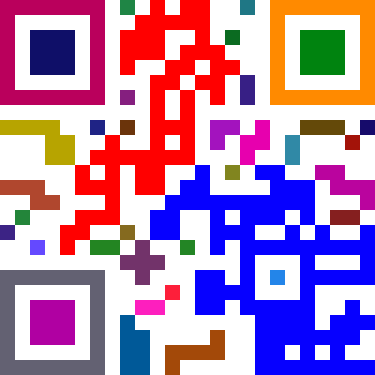
Others have noted that if you have enough contrast between foreground and background, most readers will still recognise the code – but lets make every block a different colour! Yup, it still works! Its a lot more prettier and fancier, but a thing to note is that you should still use colours that are a high contrast to the background. I guess I could have used a pale yellow instead of a white background to add more…but that’ll be just over doing it.

Source: http://www.madox.net/blog/2009/06/18/a-little-bit-of-qr-code-colour-loving/

Ok:
So let me make a test with my own code, for www.Triest.Tel:

qrcode


GIMP Image Editor

1.)
Werkzeuge
Auswahlwerkzeuge
Rechteckige Auswahl

2.)
Bild
Modus
RGB

3.)
Rechter Mouse Klick
Auswahl
Nach Farbe
Bearbeiten
Mit VG Farbe Füllen
VG/HG Farbe


First Results:


4.)
Auswahl
Auswahleditor
Auswahl
Invertieren
Mit VG Farbe Füllen
Werkzeuge
Auswahlwerkzeuge
Rechteckige Auswahl


5.)
Kanäle
Rot
(RGB, 2 Ebenen)


6.)
Malwerkzeuge
Füllen